
Coming Soon to Carefold: All Your Scattered Patient Portals in One Personal Health Chart
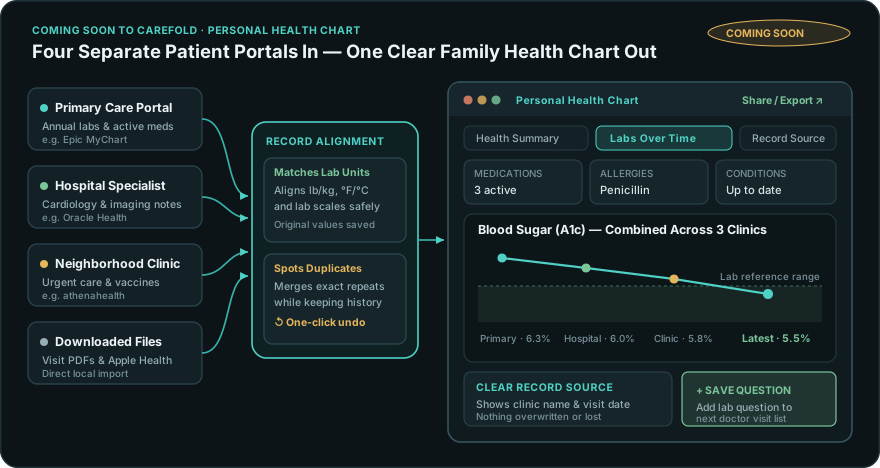
Think about where your family's medical history lives right now.
Your primary care doctor uses one patient portal. The hospital specialist you saw last spring uses another. The neighborhood urgent-care clinic where your child got a strep test has a third login, and an independent lab sent results through a fourth website whose password expired ninety days ago.
When a new doctor asks, "What medications are you currently taking, and when was your last cholesterol or blood-sugar panel?", the responsibility often falls on you or a family caregiver to gather those details across four disconnected accounts.
Coming soon in our next Carefold release, we are introducing the Personal Health Chart—a calm, unified view that brings your scattered clinic portals and downloaded health files together in one private place on your own computer.
Built for Clarity and Visit Preparation
The Personal Health Chart organizes records reported by your clinics and labs so you and your family can see your full history in one place and prepare better questions for your doctor. Every record clearly shows which clinic it came from. Original clinic values are preserved, and any merge of exact duplicates is visible and reversible.
1. Connect Your Clinics Without Storing Records on Third-Party Servers
Over the past few years, healthcare laws have required hospitals and clinics to let patients access their own digital health records. Yet most apps that connect to patient portals ask you to store your entire medical life on their company servers first.
Carefold takes a much simpler, privacy-first approach:
- Direct Connection from Your Device: Using the same patient-authorized health-sharing standard used by major health systems (for example clinics on Epic MyChart, Oracle Health, and athenahealth), Carefold lets you pull read-only copies of your records directly into your private vault at home.
- Works With Downloaded Files Too: Have older visit summaries saved as files from a former doctor, vaccination records, or exports from Apple Health? You can import them alongside your connected clinic portals so years of care sit in one timeline.
2. Different Clinics, Different Units—Finally Lined Up Clearly
Anyone who has ever tried comparing lab results from two different health systems knows how quickly small differences create confusion:
- One clinic records weight in pounds while a hospital records kilograms, or two laboratories report the exact same blood test using different measurement scales.
- Your primary doctor lists a condition under one medical term, while a specialist lists the exact same condition under slightly different wording—making it look like you have twice as many diagnoses or duplicate prescriptions.
Carefold reconciles these differences carefully and conservatively:
- Consistent Trends Without Losing Original Numbers: When labs use different standard units that can be matched with complete accuracy, Carefold lines them up on one clean chart so you can actually follow your progress over time—while always keeping the exact original number and unit reported by the lab one click away. If an unusual test cannot be matched with certainty, Carefold never guesses; it shows the lab's exact report untouched.
- Careful Duplicate Handling With One-Click Undo: When two portals send the exact same immunization or lab result twice, Carefold combines the duplicate cleanly while keeping a full record of both sources. When two entries look similar but happened at different times or carry slightly different details, Carefold never deletes either one—it keeps both visible and flags them so you can review them with your doctor. Any combined entry can also be separated again with a single click.
3. Four Clear Views Built for Patients and Caregivers
Medical records are usually formatted for hospital insurance systems, filled with codes and dense tables. Carefold's Personal Health Chart organizes your records around four clear views that actually make sense before and after an appointment:
| Personal Health Chart View | What It Gives Your Family |
|---|---|
| At-a-Glance Health Summary | One clean, printable overview of current medications, known allergies, active health conditions, immunizations, and recent vitals—ideal when seeing a new specialist or helping an aging parent after a hospital stay. |
| Labs & Trends Explorer | Follow cholesterol, blood sugar (A1c), kidney markers, thyroid levels, and routine panels across multiple years and multiple clinics, complete with the reference ranges reported by the lab. |
| One-Click "Save Question for Visit" | Notice a lab value that shifted since last year? Click Save Question right next to that result to add a clear, ready-to-ask question directly to your next doctor's appointment checklist. |
| Record Source & History Drawer | Click any medication, allergy, or lab result to see which hospital or file reported it, on what date, and whether it was updated across visits—so you never have to wonder where a record came from. |
4. Easy to Share Whenever You Need It
Because your health chart should never trap your family inside a single app, Carefold includes one-click export in universally recognized healthcare record formats—making it simple to bring a clean summary to a new clinic, share an updated medication and allergy sheet with a sibling who shares caregiving duties, or keep a personal backup.
In the final post of this series, we look at the bigger picture for families and healthcare organizations alike: why putting portable, standards-based health records in the hands of patients leads to calmer caregiving and better doctor visits for everyone.