
Clear Clinical Boundaries: How Carefold Helps Families Prepare for Medical Visits
When people look for help understanding a lab result or preparing for a parent's medical appointment, many digital health tools fall short in one of two ways.
Some conversational tools overstep their role—speculating about diagnoses from an incomplete symptom list or suggesting changes to a prescription regimen. Others apply overly broad keyword blocks: the moment you upload an older hospital discharge summary or ask "How can I ask my doctor about a more affordable generic medication?", the tool refuses to respond altogether.
Neither approach serves patients, caregivers, or clinicians well. At Spectrayan, we designed Carefold around a clear principle: a personal care companion should help you organize information and prepare questions—and always defer clinical decisions to a licensed professional.
1. Clear Roles: Preparation vs. Medical Care
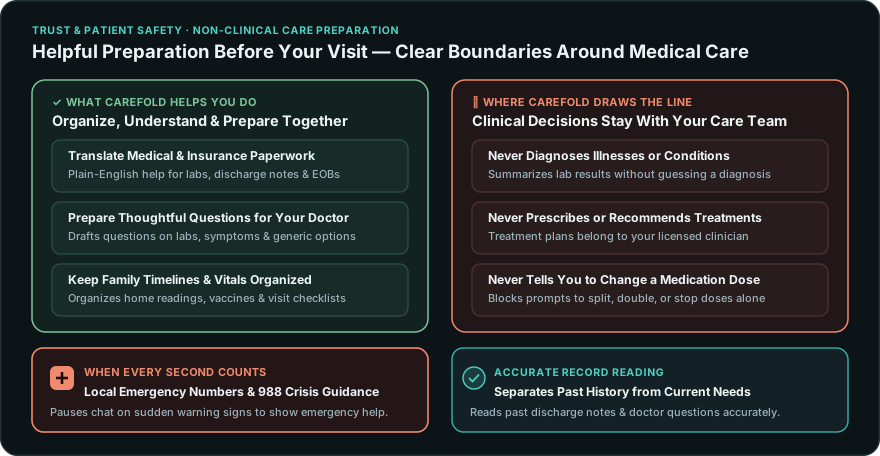
A trustworthy health tool maintains a firm boundary between organizing health information and practicing medicine. From day one, Carefold has been designed to work alongside your real-world care team:
| What Carefold Helps You Do | Where Carefold Always Steps Back |
|---|---|
| Explain unfamiliar medical & billing terms in clear, everyday language so you can review reports with confidence. | Never diagnoses conditions or tells you what illness you or a family member has. |
| Organize home readings, past labs, and timelines so you can spot patterns to share at your next checkup. | Never prescribes treatments or recommends starting a new medication. |
| Draft thoughtful questions for your doctor or pharmacist—including questions about side effects or lower-cost generic options. | Never tells anyone to split, double, skip, or stop a medication dose on their own. |
Because Carefold's helpers are designed specifically as care coordinators rather than clinical decision-makers, every summary guides you toward a clearer, better-prepared conversation with your physician, nurse practitioner, or pharmacist.
2. Direct Guidance When Every Second Counts
A software application is never the right place to manage a medical emergency.
If someone describes sudden, urgent warning signs—such as severe chest pain, signs of a stroke like facial drooping or slurred speech, acute difficulty breathing, or a mental-health crisis—Carefold does not continue a routine conversation. It immediately pauses and displays clear emergency contact guidance—including local emergency numbers and the 988 Suicide & Crisis Lifeline, in your household's chosen language.
3. Distinguishing Medical History from Urgent Symptoms
Health records and caregiver questions carry important nuances of time and intent that simple keyword rules often miss:
- Reviewing Past Medical Records Accurately: Hospital discharge papers routinely include notes such as "2022 visit: patient reported no chest pain or shortness of breath." A basic keyword check sees the words "chest pain" and interrupts your session even though you are simply organizing historical files. Carefold evaluates dates and phrasing carefully—so past records and ruled-out symptoms are organized smoothly, while present-day warning signs still receive immediate emergency guidance.
- Preparing Questions for Your Prescriber: Suppose a caregiver asks, "Mom's blood-pressure copay rose to $95 a month—can you help me phrase a question asking her cardiologist whether a lower-cost generic could work?" Carefold recognizes that you are preparing a question for her physician, not asking software to prescribe a dose. At the same time, any instruction to alter a medication dose independently ("Cut your tablet in half" or "Double your dose") is strictly blocked.
That distinction allows families to rely on Carefold for everyday appointment preparation while keeping clinical boundaries intact.
4. Transparency Around Privacy and Saved Notes
Trust also depends on how a tool handles your family's private conversations and uploaded documents:
- Clear Privacy Status: Carefold shows upfront whether you are running entirely offline on your own computer or connecting through an external AI provider you chose to configure.
- Clear Visibility Into Saved Notes: You can open Carefold's memory view at any time to see what details have been saved for each family member, update outdated information, or delete items permanently.
- Encrypted Storage at Rest: Saved conversation threads on your computer remain encrypted on disk so family health discussions are never stored in plain text.
Why Trust Comes First
Establishing clear safety boundaries and household privacy was essential before taking our next step: enabling families to connect their hospital and clinic portals directly into Carefold. In our next post, we share a preview of Carefold's upcoming Personal Health Chart—built to bring scattered medical records together in one clear, organized view.